
For UAE neighbourhood shops
Your shop, a scan away. Orders on WhatsApp.
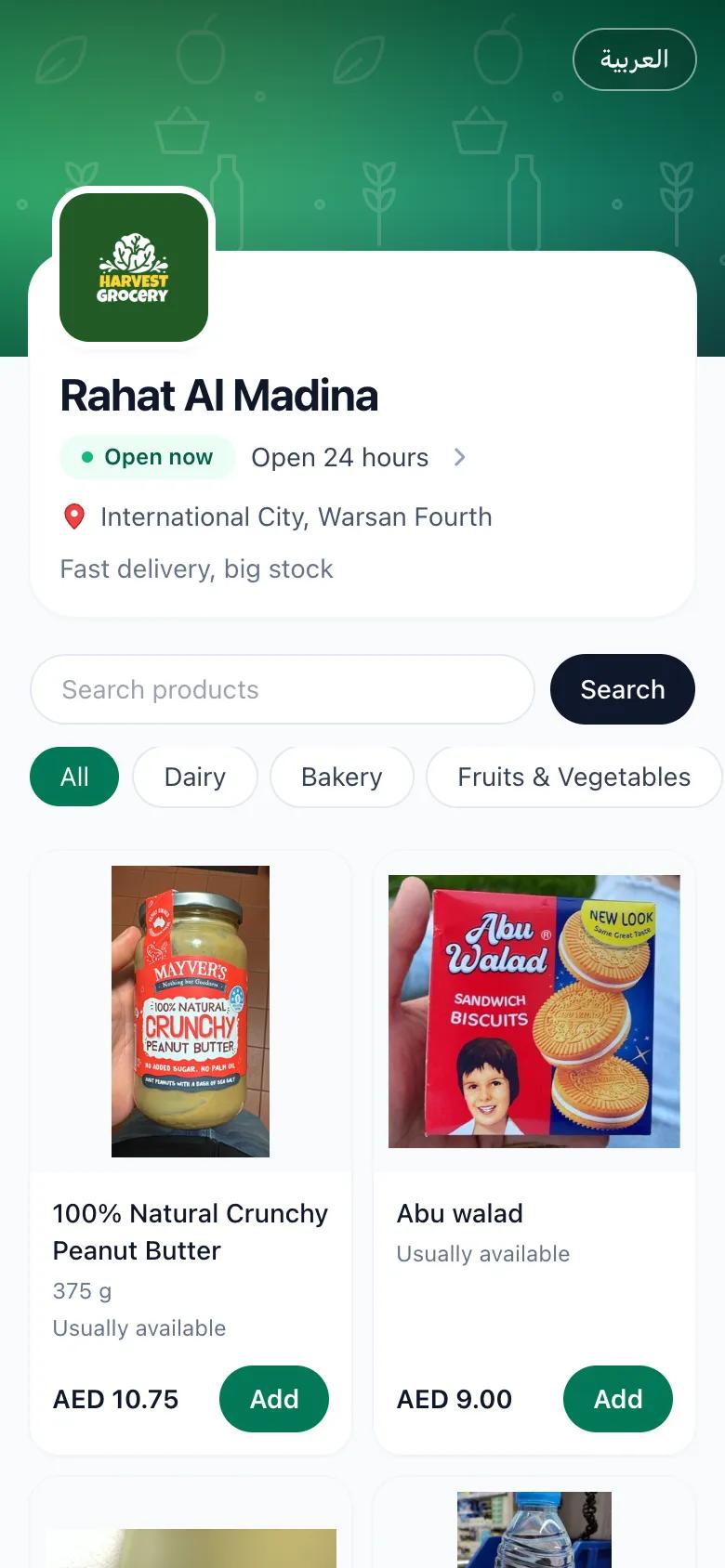
From everyday essentials to tonight’s dinner, let customers browse what you sell and build a basket. They open your QR code or link, choose their items, and send their order to your WhatsApp.
30-day free trial.
- ScanYour QR sticker or link opens your store
- SelectCustomers browse and fill a basket
- SendThe order arrives on your WhatsApp
Made for the businesses around the corner
- Groceries
- Butchers
- Bakeries
- Restaurants
- Local shops
More orders. Still your business.
Simple, flat pricing
One monthly fee. No commissions or per-order charges.
Paid straight to you
Customers pay your store directly using your accepted payment methods.
No app to download
Customers browse in their browser and order through WhatsApp. No account needed.
A familiar way to order
How your customers order
The same WhatsApp your customers already use — with a clear, structured order instead of voice notes and photos of shopping lists.
- 01
Scan your QR code
Put your printed sticker on the counter, the door or your delivery bags. Customers can also open your link from WhatsApp or Instagram.
Choose their items - 02
Choose their items
They search your catalog, browse categories and add items with quantities and notes. Arabic and English.
Send on WhatsApp - 03
Send on WhatsApp
Checkout opens WhatsApp with a ready-to-send message. The customer reviews and sends it to you, with a link to the items, quantities, prices and delivery details.
Scan your QR code
A better way to sell locally
Your store. Your customers. Your way.
You don’t need to join a marketplace to bring your neighbourhood shop online.
| What matters to your store | Traditional marketplacesSell inside someone else’s platform. | With neardoorYour own direct ordering channel. |
|---|---|---|
| Your brand | Your store appears alongside competitors. | A storefront that puts your business first. |
| Products & pricing | Product listings and offers follow platform rules. | Your products, your pricing, your brand. |
| Selling costs | Commissions and service fees can reduce your margins. | One flat monthly fee. No commissions or per-order fees. |
| Customer relationships | Customer interactions happen through the marketplace. | Direct relationships with your customers. |
| Order fulfilment | Order handling follows the platform’s processes. | You control how orders are prepared and fulfilled. |
Marketplace fees and terms vary by platform.
neardoor / Features
Your business, on your terms
From your catalog to the counter, keep the parts of your business that make it yours.
Orders you can read at a glance
Every order lists items, quantities and the total, so your team prepares it without calling back to ask.
Your store, your brand
Your name, logo, opening hours, delivery area and offers — on a page that belongs to your shop.
Delivery or pickup
Choose what you offer. Customers pick one at checkout and add their building, flat and a note for the driver.
You stay in control
Payment and delivery stay exactly as you run them today. neardoor brings you the order; you serve the customer.
Getting your catalog online
Your products. Your prices. A catalog that’s yours.
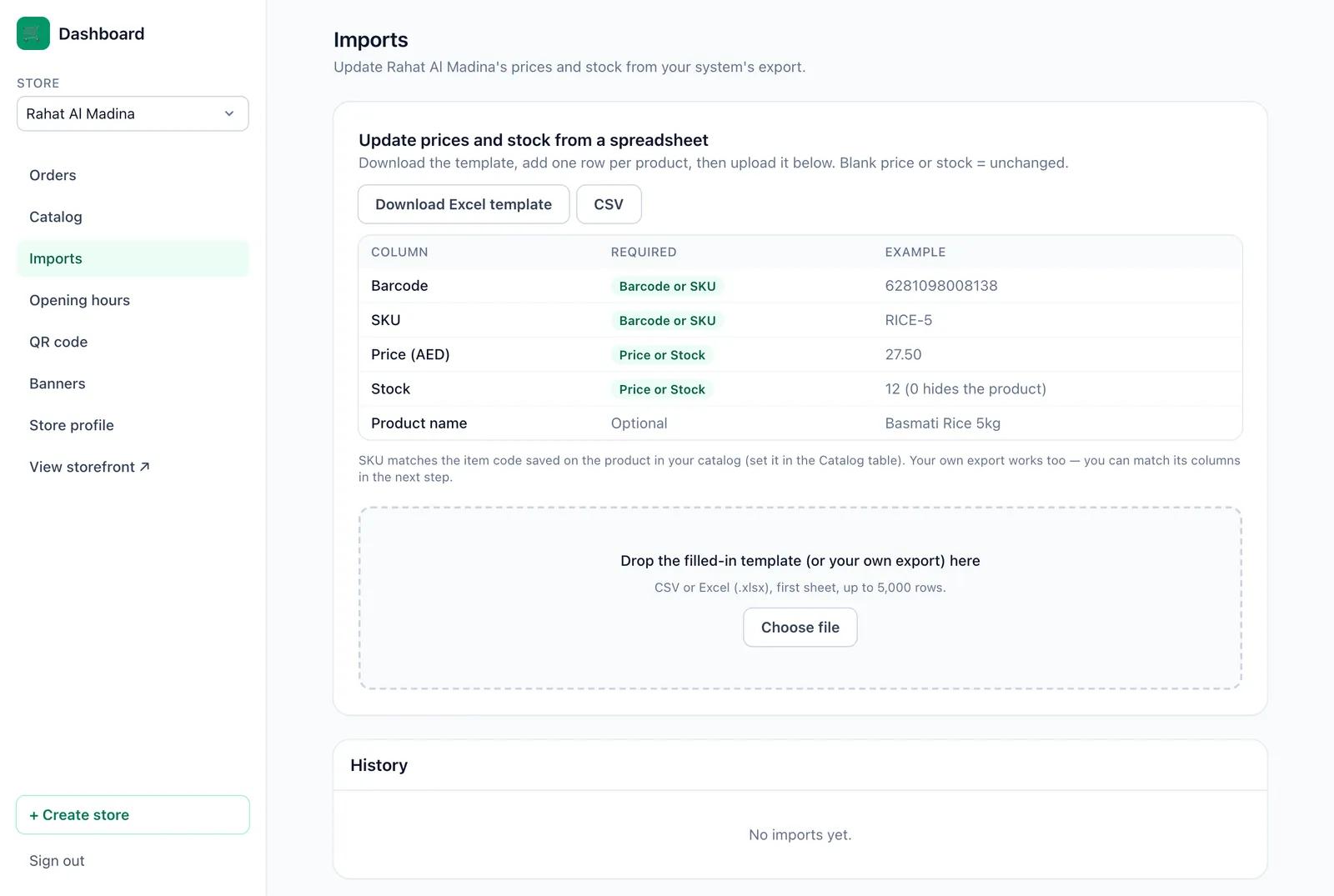
Add your own products and photos, or choose grocery essentials from the shared catalog. Organise what you sell into categories, then update prices and stock from Excel or CSV.
Download the template, or upload your own export from your system
Match products by barcode or by your own item code (SKU)
Review the changes before anything goes live
Your dashboard
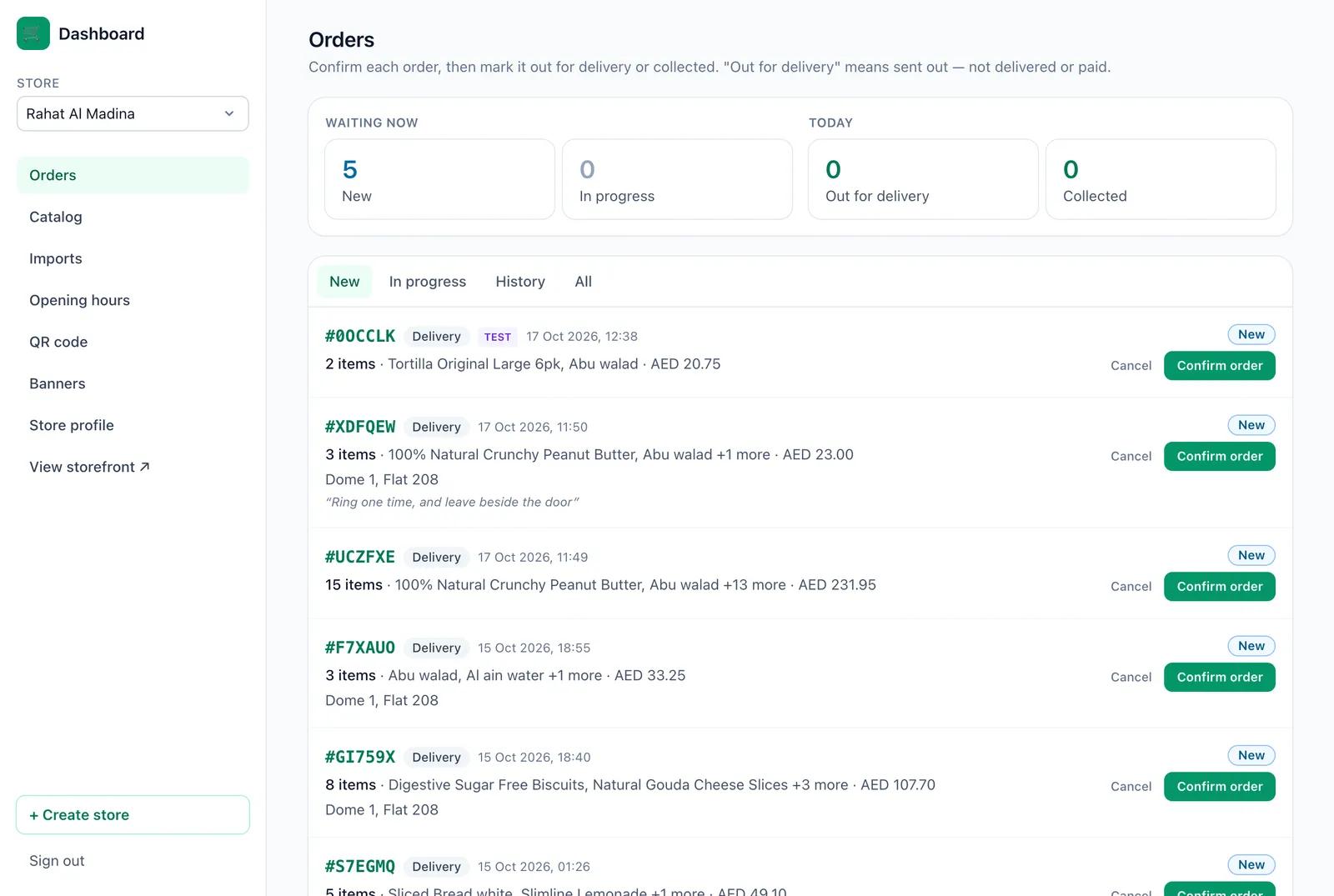
Every order in one place
See what’s waiting, confirm orders and mark them out for delivery or collected. Your staff can share the work, each with their own login.
New, in progress and history at a glance
Opening hours, delivery and pickup settings
A print-ready QR sticker and promotional banners for your storefront
Your turn to explore
See a real store in action
Open our demo supermarket, add a few items and go through checkout — exactly what your customers will see.
Open the demo storeThe demo is a working store. Please don’t send real orders from it.
- Browse the catalog
- Build a basket
- Explore checkout
neardoor / FAQs
Questions shop owners ask
A few things to know before you bring your shop online.
Have something else in mind?
Request a demoIs neardoor only for grocery shops?
No. Butchers, bakeries, restaurants and other local shops can add their own items, photos, categories and prices. Customers choose quantities, add notes and order for delivery or pickup, depending on what you offer.
Do my customers need to install an app or create an account?
No. Your store opens in the phone’s browser from your QR code or link, and the order is sent through WhatsApp, which they already have.
How do I receive orders?
Each order arrives as a WhatsApp message on your store’s number, with a link to the full order. All orders are also listed in your dashboard.
Does neardoor take payments or deliver orders?
No. You keep collecting payment and delivering (or handing over at the counter) the way you do today.
Can I upload prices from my system?
Yes. Upload an Excel or CSV file — our template or your own export — and match products by barcode or item code.
Is it available in Arabic?
Your storefront and checkout are in Arabic and English, and customers can switch at any time. The merchant dashboard is in English for now.
Can I try it before talking to you?
Yes — open the live demo store above. When you’re ready, request a demo and we’ll set up your store with you.
Let’s talk about your shop
Make your next chapter a little closer.
Leave your details and we’ll contact you to set up your store.
What we can walk through
Your catalog, products and prices
Delivery and pickup for your shop
Your first test order, from scan to WhatsApp
Request a demo
Start with a 30-day free trial.After your trial, one flat monthly fee. No commissions. No per-order fees.